TIL
[250218 TIL]팀원 카드 생성 및 수정
도원좀비
2025. 2. 18. 21:10
작성한 코드
<!DOCTYPE html>
<html lang="ko">
<head>
<meta charset="UTF-8">
<meta name="viewport" content="width=device-width, initial-scale=1.0">
<title>7조 페이지 - 팀원 추가</title>
<link href="https://cdn.jsdelivr.net/npm/bootstrap@5.3.0/dist/css/bootstrap.min.css" rel="stylesheet">
<script src="https://cdn.jsdelivr.net/npm/bootstrap@5.3.0/dist/js/bootstrap.bundle.min.js"></script>
<style>
body {
background-color: #f7fafb;
color: black;
height: 100vh;
display: flex;
justify-content: center;
align-items: center;
margin: 0;
}
.title {
margin-bottom: 20px;
}
.form-container {
width: 90%;
max-width: 600px;
padding: 25px;
/* border: 2px solid black; */
border-radius: 10px;
background-color: white;
box-shadow: 0px 4px 8px rgba(0, 0, 0, 0.2);
}
.input-group {
position: relative;
}
.form-label {
color: #f8f9fa;
font-weight: bold;
}
.form-control {
border-radius: 8px;
padding: 10px;
font-size: 1rem;
}
.form-control:focus {
border-color: #f8f9fa;
box-shadow: 0px 0px 5px rgba(248, 249, 250, 0.8);
}
.btn-custom {
background-color: #f8f9fa;
color: #212529;
font-weight: bold;
padding: 12px;
width: 100%;
border-radius: 8px;
transition: 0.3s;
}
.btn-custom:hover {
background-color: #e2e6ea;
transform: scale(1.05);
}
.form-icon {
position: absolute;
left: 10px;
top: 50%;
transform: translateY(-50%);
color: #6c757d;
}
.input-group input {
padding-left: 35px;
}
.image-preview {
width: 100%;
max-width: 300px;
height: auto;
margin-top: 20px;
border-radius: 8px;
display: none;
}
</style>
<script type="module">
import { getFirestore, collection, addDoc, getDoc, updateDoc, doc } from "https://www.gstatic.com/firebasejs/9.22.0/firebase-firestore.js";
const firebaseConfig = {
apiKey: "-----------------------",
authDomain: "------------------------",
projectId: "---------------------------",
storageBucket: "-------------------------------",
messagingSenderId: "--------------------------------",
appId: "---------------------------------"
};
// 파이어베이스 앱 초기화
const app = initializeApp(firebaseConfig);
const db = getFirestore(app);
// 데이터 가져오기
async function getData(id) {
if (!id) return;
// 멤버 데이터 가져오기기
try {
const docRef = doc(db, "members", id);
const docSnap = await getDoc(docRef);
// 데이터 유무 검사사
if (docSnap.exists()) {
const member = docSnap.data();
$("#name").val(member.name);
$("#mbti").val(member.mbti);
$("#advantage").val(member.advantage);
$("#style").val(member.style);
$("#blog").val(member.blog);
$("#image").val(member.image);
$("#imagePreview").attr("src", member.image).show();
} else {
console.log("해당 멤버가 존재하지 않습니다.");
}
} catch (error) {
console.error("데이터 가져오기 실패:", error);
}
}
$(document).ready(function () {
// URL 파라미터,ID 가져오기
const urlParams = new URLSearchParams(window.location.search);
const id = urlParams.get('id');
// ID값의 유무에 따라 텍스트가 바뀌는 조건 부여
if (id) {
$("#savePost").text("수정");
getData(id);
} else {
$("#savePost").text("추가");
}
if (id) {
$("#team").text("팀원 수정");
getData(id);
} else {
$("#team").text("팀원 추가");
}
// 이미지 URL 입력시 미리보기
$("#image").on("input", function () {
const imageUrl = $(this).val();
if (imageUrl) {
$("#imagePreview").attr("src", imageUrl).show();
} else {
$("#imagePreview").hide();
}
});
});
// 저장 버튼 클릭시
$("#savePost").click(async function () {
const urlParams = new URL(location.href).searchParams;
const id = urlParams.get('id');
// 입력값 가져오기
let image = $('#image').val();
let name = $('#name').val();
let mbti = $('#mbti').val();
let advantage = $('#advantage').val();
let style = $('#style').val();
let blog = $('#blog').val();
// 필드 유무 검사
if (!name || !mbti || !advantage || !style || !blog || !image) {
alert("모든 필드를 입력해주세요!");
return;
}
// 데이터 객체 생성
let docData = {
'image': image,
'name': name,
'mbti': mbti,
'advantage': advantage,
'style': style,
'blog': blog
};
// 데이터 추가 또는 수정
try {
if (id) {
const docRef = doc(db, "members", id);
await updateDoc(docRef, docData);
alert('수정 완료!');
} else {
await addDoc(collection(db, "members"), docData);
alert('추가 완료!');
}
// 성공하면 메인 페이지로 이동
window.location.href = "index.html";
} catch (error) {
console.error("오류 발생:", error);
alert("작업 실패");
}
});
</script>
</head>
<body>
<div class="container py-5 d-flex flex-column align-items-center">
<div class="form-container">
<h1 class="title text-center" id="team">팀원 추가</h1>
<form id="memberForm">
<div class="mb-3 input-group">
<i class="form-icon bi bi-person-fill"></i>
<input type="text" class="form-control" id="name" placeholder="이름을 입력하세요" required>
</div>
<div class="mb-3 input-group">
<i class="form-icon bi bi-brain"></i>
<input type="text" class="form-control" id="mbti" placeholder="MBTI 유형을 입력하세요" required>
</div>
<div class="mb-3 input-group">
<i class="form-icon bi bi-lightbulb-fill"></i>
<input type="text" class="form-control" id="advantage" placeholder="본인의 장점" required>
</div>
<div class="mb-3 input-group">
<i class="form-icon bi bi-people-fill"></i>
<input type="text" class="form-control" id="style" placeholder="협업 스타일" required>
</div>
<div class="mb-3 input-group">
<i class="form-icon bi bi-link"></i>
<input type="text" class="form-control" id="blog" placeholder="블로그 주소" required>
</div>
<div class="mb-3 input-group">
<i class="form-icon bi bi-image"></i>
<input type="text" class="form-control" id="image" placeholder="사진 URL을 입력하세요" required>
</div>
<img id="imagePreview" class="mb-3 input-group">
<button id="savePost" type="button" class="btn btn-custom">추가</button>
</form>
</div>
</div>
</body>
</html>
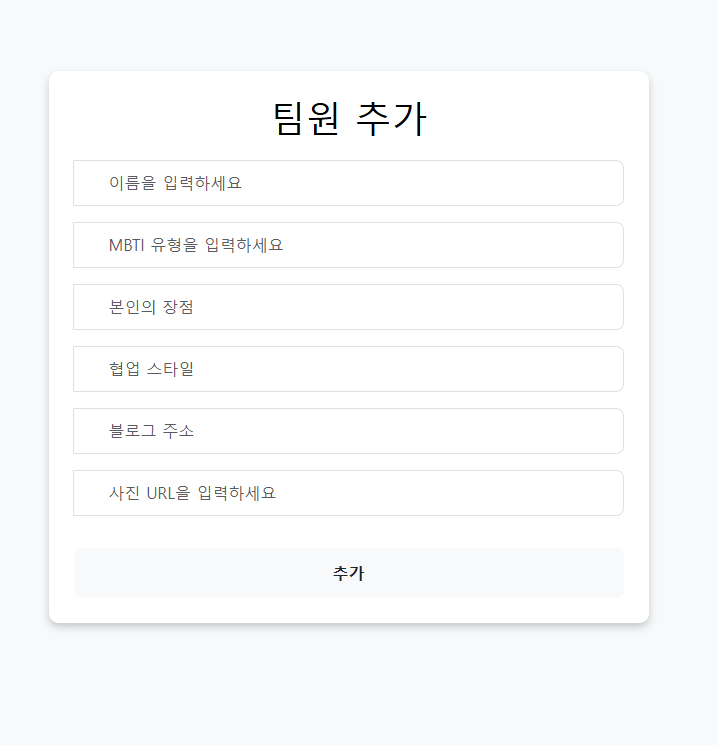
구현된 화면
(회원 아이디값이 없을 때)
(회원 아이디 값이 있을 때)
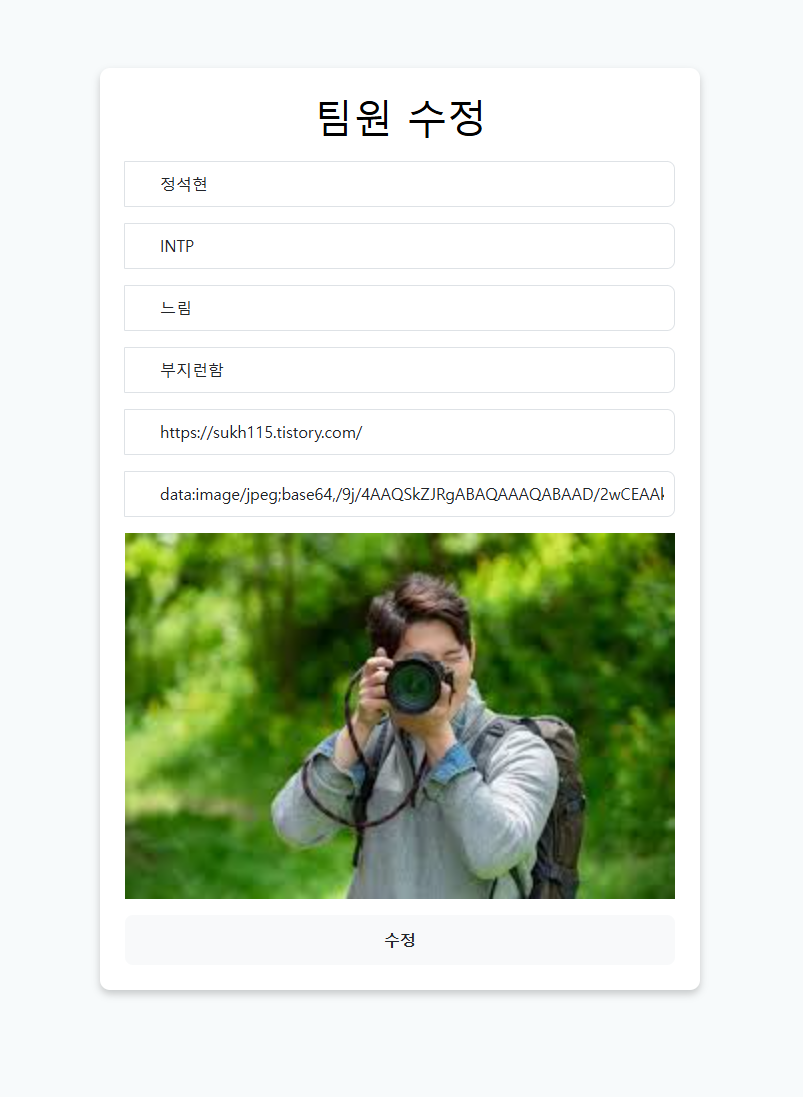
회원의 아이디 값이 존재하면 팀원 추가에서 수정으로 바뀐다.
생성과 수정을 한페이지에 구현했다.