TIL
[250305 TIL] Java 파일 이름 바꾸기
도원좀비
2025. 3. 5. 21:15
1. 프로젝트 개요
이 프로그램은 사용자가 입력한 디렉터리에서 파일 이름을 변경 할 수 있도록 만들고있다.
기본적인 기능으로는
- 특정 파일의 이름 변경
- 여러 파일을 한꺼번에 변경
- 파일 및 디렉터리 유효성 검사
2. 코드 구성
프로그램은 다음과 같이 4개의 Java 파일로 구성
- ValidFile.java : 파일과 디렉터리의 유효성을 검사하는 클래스
- FileUtils.java : 디렉터리 내 파일 목록을 출력하는 유틸리티 클래스
- FileRenamer.java : 파일 이름 변경 기능을 담당하는 핵심 클래스
- Main.java : 프로그램 실행을 담당하는 메인 클래스
3. 코드 설명
3-1 파일 및 디렉터리 유효성 검사 - ValidFile.java
- 프로젝트동안 여러 유효성 검사(ex. 금지된문자, 파일이나 디렉터리의 존재 등)를 확인하는 기능을 수행
import java.io.File;

public class ValidFile {

    private static final String INVALID_CHARACTERS = "[<>:\"/\\\\|?*]";

    // 디렉터리 유효성 검사
    public boolean isDirectoryValid(String directoryPath) {
        File folder = new File(directoryPath);
        if (!folder.exists() || !folder.isDirectory()) {
            System.out.println("해당 디렉터리가 존재하지 않거나 유효하지 않습니다. : " + directoryPath);
            return false;
        }
        return true;
    }

    // 파일 유효성 검사
    public boolean isFileValid(String filePath) {
        File file = new File(filePath);
        if (!file.exists() || !file.isFile()) {
            System.out.println(" 해당 파일이 존재하지 않습니다 : " + filePath);
            return false;
        }
        return true;
    }
    // 파일 이름 유효성 검사 (공백 + 금지된 문자 체크)
    public boolean isValidFileName(String fileName) {
        if (fileName == null || fileName.trim().isEmpty()) {
            System.out.println("파일 이름이 비어 있습니다.");
            return false;
        }
        if (fileName.matches(".*" + INVALID_CHARACTERS + ".*")) {
            System.out.println("파일 이름에 사용할 수 없는 문자가 포함되어 있습니다: " + fileName);
            return false;
        }
        return true;
    }
}
3.2 파일 목록 출력 - FileUtils.java
- 디렉터리 내에 어떤 파일이 있는지 출력하는 기능을 제공합니다.
import java.io.File;

public class FileUtils {
    // 1. 속성
    private String directoryPath;
    private ValidFile validFile;

    // 2. 생성자
    public FileUtils(String directoryPath, ValidFile validFile){
        this.directoryPath = directoryPath;
        this.validFile = validFile;
    };

    // 3. 기능
    // 파일 리스트
    public void listFiles() {
        // 디렉터리 유효성 검사
        if (!validFile.isDirectoryValid(directoryPath)){
            return;
        }

        File folder = new File(directoryPath);
        File[] files = folder.listFiles(); // 폴더 내 파일 목록 가져오기


        // 파일 목록 불러오기
        System.out.println(directoryPath + "내 파일 목록 : ");
        for (File file : files) {
            if (file.isFile()) {
                System.out.println(" - " + file.getName());
            }
        }
    }
}
3.3 파일 이름 변경 기능 - FileRenamer.java
- 사용자가 입력한 디렉터리에서 파일 이름을 변경하는 기능들을 수행하는 클래스
[1] 단일 파일 이름 변경 기능
사용자가 기존 파일 이름과 새로운 파일 이름을 입력하면 변경
// 단일 파일 변경 처리
private void renameSingleFile() {
    String oldName, newName;

    //  기존 파일 이름 입력 (유효할 때까지 반복)
    while (true) {
        System.out.print("변경할 파일 이름 입력: ");
        oldName = scanner.nextLine();

        // 파일 이름 유효성 검사
        if (!validFile.isValidFileName(oldName)) {
            continue;
        }
        // 파일 유무 유효성검사
        if (!validFile.isFileValid(directoryPath + "/" + oldName)){
            continue;

        }
        break;
    }

    //  새 파일 이름 입력 (유효할 때까지 반복)
    while (true) {
        System.out.print("새 파일 이름 입력: ");
        newName = scanner.nextLine();
        // 파일 이름 유효성 검사
        if (!validFile.isValidFileName(newName)) {
            continue;
        }
        // 동일한 이름의 파일이 이미 존재하는지 검사
        File newFile = new File(directoryPath, newName);
        if (newFile.exists()) {
            System.out.println("이미 같은 이름의 파일이 존재합니다: " + newName);
            System.out.println("다른 파일 이름을 입력하세요.");
            continue;
        }
        break;
    }

    File oldFile = new File(directoryPath, oldName);
    File newFile = new File(directoryPath, newName);


    rename(oldFile, newFile);
}
[2] 여러 개 파일 Batch Rename 기능
지정한 공통 이름과 시작 번호 기준으로 해당 디렉터리의 모든 파일을 이름 변
// 여러 개 파일 Batch Rename 처리
private void batchRenameFiles() {
    String baseName;
    int startNumber;

    //  공통 이름 입력
    while (true) {
        System.out.print("변경할 파일의 공통 이름 입력: ");
        baseName = scanner.nextLine();
        if (validFile.isValidFileName(baseName)) {
            break;
        }
    }

    //  시작 번호 입력
    while (true) {
        System.out.print("시작 번호 입력: ");
        if (scanner.hasNextInt()) {
            startNumber = scanner.nextInt();
            scanner.nextLine(); // 개행 문자 제거
            if (startNumber >= 0) {
                break;
            }
        } else {
            scanner.nextLine(); // 잘못된 입력 제거
        }
        System.out.println("시작 번호는 0 이상이어야 합니다.");
    }

    File folder = new File(directoryPath);
    File[] files = folder.listFiles();

    //  변경할 파일이 없을 경우 다시 입력 요청
    if (files == null || files.length == 0) {
        System.out.println("변경할 파일이 없습니다. 다시 입력하세요.");
        batchRenameFiles();
        return;
    }

    int count = startNumber;
    for (File file : files) {
        if (file.isFile()) {
            String extension = "";
            int dotIndex = file.getName().lastIndexOf(".");
            if (dotIndex != -1) {
                extension = file.getName().substring(dotIndex);
            }

            String newName = baseName + "_" + count + extension;
            File newFile = new File(directoryPath, newName);

            // 🔹 기존에 같은 이름의 파일이 있는지 확인
            if (newFile.exists()) {
                System.out.println("⚠이미 같은 이름의 파일이 존재합니다: " + newName);
                continue;
            }

            rename(file, newFile);
            count++;
        }
    }
    System.out.println("Batch Rename 완료!");
}
[3] 파일 이름 변경 실행 로직
파일 이름을 실제로 변경하는 메서드
// 파일 이름 변경 로직 (공통)
private boolean rename(File oldFile, File newFile) {
    if (!validFile.isFileValid(oldFile.getPath())) {
        return false;
    }

    if (oldFile.renameTo(newFile)) {
        System.out.println("파일 이름 변경 성공: " + oldFile.getName() + " → " + newFile.getName());
        return true;
    } else {
        System.out.println("파일 이름 변경 실패: " + oldFile.getName());
        return false;
    }
}
3.4 프로그램 실행 - Main.java
사용자로부터 디렉터리 경로를 입력받아 FileRenamer를 실행하는 역할을 합니다.
import java.util.Scanner;


public class Main {
    public static void main(String[] args) {
        Scanner scanner = new Scanner(System.in);

        System.out.print("파일이 있는 디렉터리 경로 입력: ");
        String directoryPath = scanner.nextLine();


        // 파일 이름 변경 실행
        FileRenamer fileRenamer = new FileRenamer(directoryPath);
        fileRenamer.renameFiles();

        scanner.close();
    }
}
4. 실행 예제
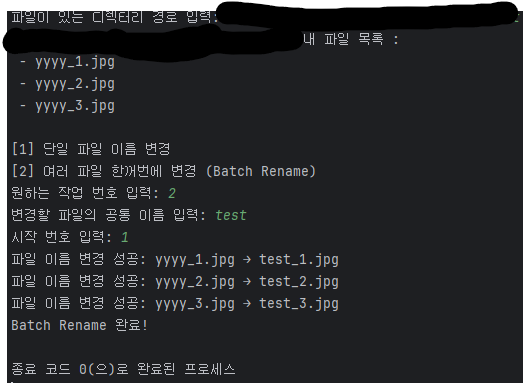
5. 마무리
아직 진행중인 프로젝트지만 현재 진행 상황이고 지금까지를 통해 이전 계산기를 통해 배운 여러기능들과 하고 싶었던 알고리즘을 구성하는데 중점을 뒀었다.
이후에 튜터님께 피드백 받은 사항있다.
- Main.java에서 해당 프로그램이 어떻게 진행되는지 보이게 하기(목차 보듯이)
- 파일이나 메서드 변수 등의 이름이 규칙에 맞게 제대로 쓰기(동사먼저 나오게)
- 추상화의 수준을 균일하게 맞춰서 읽기 쉽게 만들기
- 메서드를 봤을 때 흐름에 따라 읽을 수 있게 코딩하기
다음 수정사항은 피드백 사항을 적용 한 후에 추가 기능을 넣어볼 예정이다 가능하면 GUI까지 해보고싶다.